
Valmay by HealthTech
AI Web Chat And Booking
On Your Website
Valmay is one bundled plan: tuned web chat plus online scheduling for up to 2 Providers. It lives on your practice website, patient portal, or HealthClinics page. Patients chat where they already look for care. Valmay books real visits into your practice calendar, with optional Google Calendar sync.
Run The AI Booking Agent From Your Website Or EHR
Not just another booking button on HealthClinics. Patients can already book online on HealthClinics.com. Valmay is tuned web chat on surfaces you own: your practice website, patient portal, EHR patient flows, and clinic pages. It answers questions, captures leads, and books into your real calendar when patients chat with you online.
Your Website
Add Valmay to your practice site so visitors can book without calling or hunting for a form.
Portal And EHR
Meet patients in the portal or EHR experience they already use, with chat that books the same schedule.
HealthClinics Pages
Also available on your HealthClinics clinic page. Same agent, same calendar, wherever patients find you.
Google Calendar
Update Your Times In Google.Patients Only See What Is Free.
Connect Google Calendar as an add-on. Work from Google if you prefer. Create, move, or cancel visits there and HealthClinics stays aligned. Busy time also stops Valmay and online booking from offering those slots.
- Work from Google all day if you prefer
- Google create / reschedule / cancel become HealthClinics appointments
- Busy blocks and meetings in Google update what patients can book
- Outlook, Apple, and other calendars available for an additional fee
Two-Way: Practice Calendar And Google
Practice schedule sync
- 1
Practice schedule
Provider hours and open slots live in HealthClinics. Valmay reads and books this calendar.
- 2
Bookings push to Google
New and updated visits appear on the Google Calendar providers already use.
- 3
Work from Google too
Create, move, or cancel in Google and HealthClinics appointments update to match. Busy time stays blocked for patients.
What Valmay Does
Built To Book Real Appointments
Valmay talks to patients on your website or portal and writes confirmed visits into the practice calendar your team already runs.
Three Steps From Hello To Booked
Real slots. Real appointments. No invented availability.
1
Patient Opens Chat
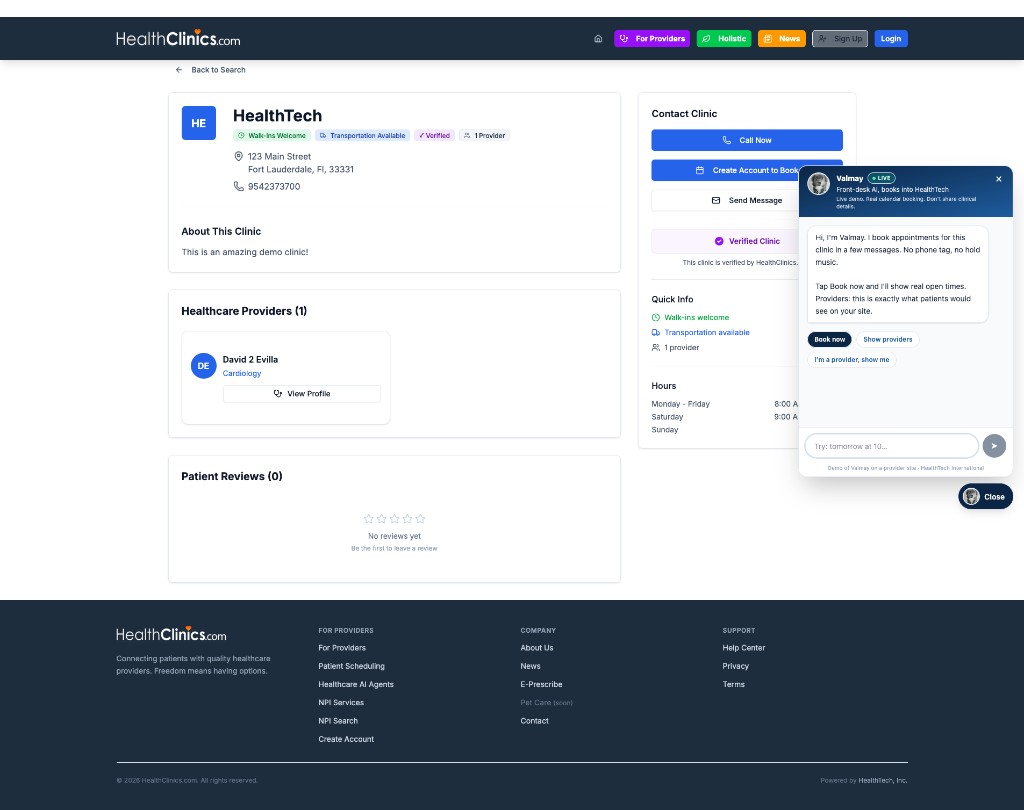
On your website, portal, or clinic page, Valmay greets them and offers to book in a few messages.
2
Checks Your Schedule
Valmay reads open times from your practice calendar, including busy times you set in Google.
3
Booked On Your Calendar
The appointment is created in HealthClinics and can appear on the provider Google Calendar.
Live demo
Feel It Before You Buy It
Try Valmay on the HealthTech clinic page. Same booking flow patients get when Valmay is embedded on your own site or portal.
Open Live Demo
Valmay
Demo conversation
Put Valmay On Your Website.
One plan at $349 per month: tuned web chat, patient Q&A, and online booking for up to 2 Providers. Embed on your website, portal, or EHR and let patients book around the clock into your live practice calendars. Start with the live demo, then review plans and setup.
Plans And Setup
Valmay Pricing
Review plans, setup, and add-ons in one place.
Pricing
Plans and prices, listed upfront
Valmay is one bundled plan: tuned web chat for your practice plus online scheduling for up to 2 Providers. Every monthly rate below is listed here. Portal, EHR, and custom embeds are confirmed on a short setup consult before you commit.
Typical cost to go live with Valmay
From $848 to launch
($499 setup + $349 first month)
Startup total, not a monthly rate. After launch, Valmay is $349/month for up to 2 Providers. Google Sync add-on is $149/month. Setup bundle with Google is $699 one time.
Scheduling Starter
Online booking only. No AI agent.
No setup fee
- One flat price, however many providers you have
- 25 online bookings a month, shared clinic-wide
- Provider calendar management
- Shareable booking links and reminders
- Upgrade to Directory Pro ($149/provider) for unlimited booking plus a Preferred Listing
Valmay
Web chat tuned for your practice plus online scheduling for 2 Providers. One bundled plan.
+ $499 one-time setup (Standard tier)
- Clinic-branded AI chat on your website, portal, or HealthClinics page
- Tuned Q&A for hours, services, insurance, and how to get care
- Online booking for up to 2 Providers. No separate scheduling plan for them.
- Always-on chat, lead capture, tap-to-call, and callback requests
- In-chat booking into live practice calendars
- $99 per month for each additional Provider beyond 2
- Hands-on setup: AI tuning, calendar config, embed, and go live test
Included: clinic-branded
Patients see your practice name in the chat on your site or HealthClinics page. Standard Valmay setup includes this at no extra fee.
Optional: full white-label
Your logo, colors, and no Valmay branding. Available on Portal and EHR setups, quoted on your consult. Not required for website embeds.
Google Calendar Sync
Full two-way sync with Google Calendar
- Bookings push to Google
- Create, move, or cancel visits in Google
- Those changes become HealthClinics appointments
- Busy time blocks Valmay and online booking
- Setup included with Valmay + Google bundle ($699 one-time)
Additional Calendars
Outlook, Apple, and other practice calendars
- Integrate additional provider calendars
- Scoped to your practice workflow
- Portal / EHR / PMS integrations quoted separately
One-time setup fees
Setup is billed once, separate from your monthly plan. Choose the tier that matches where Valmay will live. Portal and EHR work is confirmed on your consult.
Standard
HealthClinics page or website embed. Setup for up to 2 Providers.
one-time
- AI tuned to answer front desk and customer service questions
- Clinic and provider calendar configuration
- Clinic-branded embed on your HealthClinics page or website
- End-to-end booking test before go live
- 30-day post-launch check-in
Website + Google Sync
Everything in Standard, plus Google Calendar on day one
one-time
- Google Calendar two-way sync connected and verified
- Busy blocks and slot visibility tested
- Providers can work from Google or HealthClinics
Portal / EHR
Patient portal, EHR patient flows, or multi-surface embeds
one-time, quoted
- IT coordination and custom embed scoping
- Multiple booking surfaces where patients already are
- Full white-label optional: your logo, colors, no Valmay branding
- Final price confirmed on your setup consult before billing
Valmay by HealthTech. Scheduling by HealthClinics.com. Monthly plans cancel anytime. Setup fees are one-time. Final pricing for portal and EHR work is confirmed before billing.
* Scheduling Starter includes 25 patient bookings online per billing period, shared across the clinic. Appointments your team books are unlimited. Unlimited plans are subject to our fair use policy.